The Market Won't Wait For You — Unless You Tell It To
You've found the perfect trade setup. The chart looks beautiful. Your analysis says "buy." But the price is at 1.1050 and you want to enter at 1.1020 — a slightly better price. What do you do?
If you click "Buy" right now, you'll get filled at 1.1050. But if you use the right order type, you can tell your broker: "Buy for me at 1.1020, and don't do anything until the price gets there."
That's the power of order types. They're the tools that let you execute your strategy precisely — entering at the prices you want, exiting at the levels you plan, and protecting yourself when you can't watch the screen.
The Two Main Categories
Every order falls into one of two categories:
- Market Orders — Execute immediately at the current price
- Pending Orders — Wait until a specific price is reached, then execute
Most beginners only use market orders. Most professionals use a combination of both. Here's why.
Market Orders: Instant Execution
A market order tells your broker: "Buy/sell right now at whatever the current price is."
When to Use
- You want to enter immediately — the setup is happening right now
- During high-liquidity sessions (London, New York overlap)
- When the exact entry price doesn't matter as much as being in the trade
When NOT to Use
- During news events (spreads widen, you might get a terrible price)
- In illiquid markets (exotic pairs, weekend gaps)
- When you have a specific price level in mind
⚠️ Slippage warning: In fast-moving markets, the price you click might not be the price you get. This is called slippage, and it's more common during volatile moments like news releases.
Pending Orders: The Smart Way to Enter
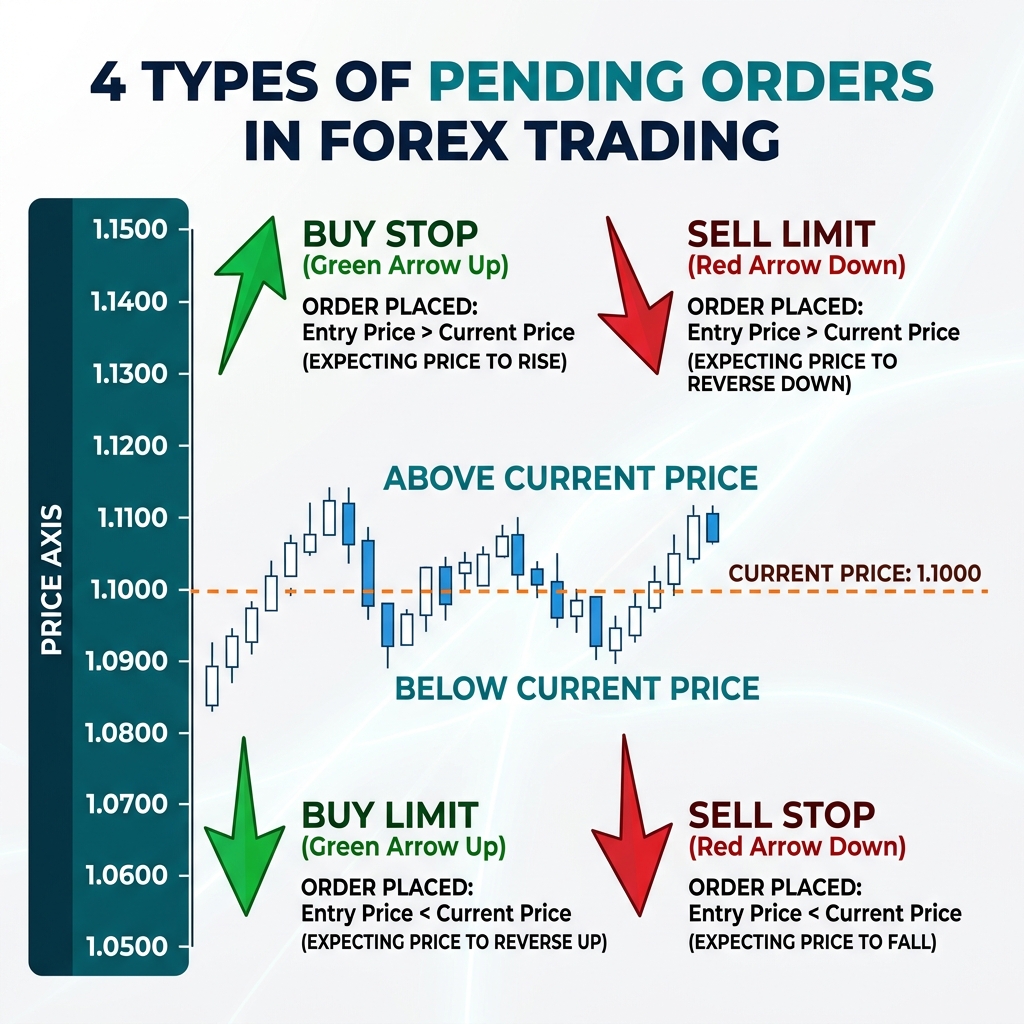
Pending orders let you pre-set your entries so the trade triggers automatically when price reaches your level. There are four types:
| Order Type | Direction | Price Condition | Use Case |
|---|---|---|---|
| Buy Limit | Buy | Below current price | Buy at a better (lower) price |
| Sell Limit | Sell | Above current price | Sell at a better (higher) price |
| Buy Stop | Buy | Above current price | Buy on a breakout upward |
| Sell Stop | Sell | Below current price | Sell on a breakdown downward |
Limit Orders — "I Want a Better Price"
A Buy Limit is placed below the current price. You're saying: "I believe price will dip to this level, then bounce back up." It's a bargain-hunting order.
A Sell Limit is placed above the current price. You're saying: "I think price will rally to this level, then reverse down."
Risk: Price might never reach your limit level — you miss the trade entirely.
Stop Orders — "I Want to Ride the Momentum"
A Buy Stop is placed above the current price. You're saying: "If price breaks above this resistance level, the momentum will carry it higher — buy me in."
A Sell Stop is placed below the current price. You're saying: "If price breaks below this support level, the drop will accelerate — sell me in."
Risk: False breakouts — price triggers your stop order then reverses.
Exit Orders: Stop Loss and Take Profit
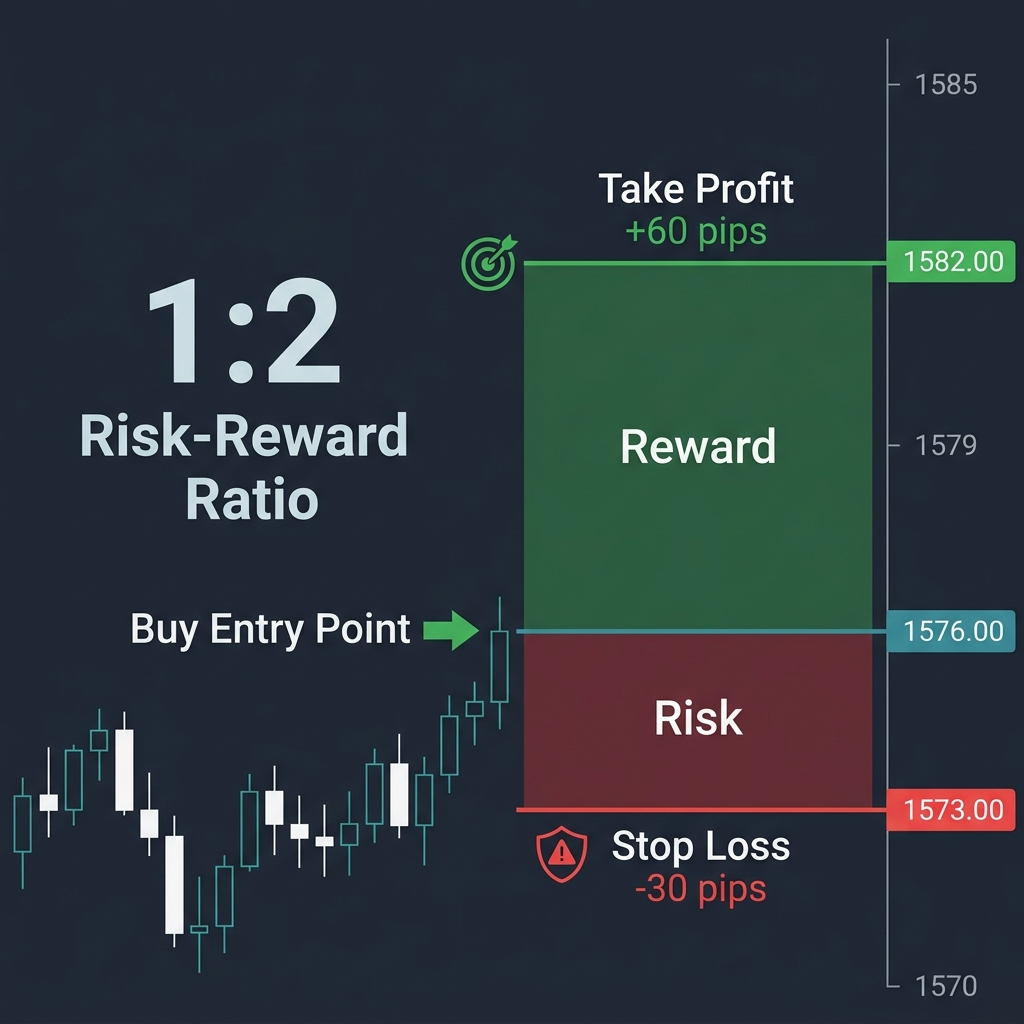
Once you're in a trade, you need a plan for getting out. That's where these two critical orders come in:
Stop Loss (SL) — Your Safety Net
A stop loss automatically closes your trade at a predetermined loss level. It protects you from catastrophic losses when the market goes against you.
Think of a stop loss like a seatbelt: you hope you never need it, but you always wear it.
Example: You buy EUR/USD at 1.1050, and set a stop loss at 1.1020. If price drops to 1.1020, your trade closes automatically with a 30-pip loss. Without a stop loss? That 30-pip drop could become 100 pips — or worse.
Take Profit (TP) — Your Victory Target
A take profit automatically closes your trade when price reaches your target profit level. It removes the temptation to hold too long and protects your gains.
Example: You buy EUR/USD at 1.1050, TP at 1.1110. When price hits 1.1110, you automatically pocket 60 pips — even if you're asleep, at work, or away from your computer.
Putting It All Together: A Complete Trade Setup
Here's what a professional trade looks like using multiple order types:
- Analysis: EUR/USD is at 1.1050. You see support at 1.1020
- Entry: Set a Buy Limit at 1.1025 (catching the dip)
- Stop Loss: Set at 1.0995 (30 pips below entry)
- Take Profit: Set at 1.1085 (60 pips above entry)
- Risk-Reward: 1:2 ratio ✅
You set everything up, close your laptop, and let the market do its thing. That's the power of order types — they execute your strategy even when you're not watching.
Advanced: Trailing Stop Loss
A trailing stop is a stop loss that moves with the price as it goes in your favor. If price rises 40 pips, your stop adjusts 40 pips higher. If price then reverses, you're stopped out at a better price than your original stop.
This is useful for capturing runners — trades that go much further than expected. You lock in profit as the trade moves, without having to manually adjust your stop.
Frequently Asked Questions
Can my stop loss be skipped?
In extreme situations (flash crashes, major news gaps), your stop loss might not execute at the exact price — this is called slippage. It's rare but possible. Using a stop loss is still far better than not using one.
Should I always use a take profit?
Not always. Some strategies use trailing stops instead, letting profits run. But for beginners, a take profit ensures you actually take your profits instead of watching them disappear.
Can I change my orders after placing them?
Yes — you can modify or cancel pending orders at any time before they're triggered. You can also move your stop loss and take profit on open positions. Just never move your stop loss further away to avoid a loss — that's a recipe for disaster.
What's the best risk-reward ratio?
Most professionals aim for at least 1:2 (risk 30 pips to make 60). This means you only need to win 33% of your trades to break even. Some strategies use 1:3 or higher.
Quick Recap
- ✅ Market orders execute instantly at current price
- ✅ Limit orders wait for a better entry price
- ✅ Stop orders trigger on breakouts/breakdowns
- ✅ Stop Loss = mandatory safety net on every trade
- ✅ Take Profit = automatic exit at your target
- ✅ Always plan your entry + exit before opening a trade
🎯 Your Action Step
Open your demo account and practice placing each type of pending order on EUR/USD. Set a Buy Limit 20 pips below current price, a Sell Limit 20 pips above, and watch what happens. Add a stop loss and take profit to each. This exercise will make you comfortable with your platform's order system — a skill you'll use every single day.