
You Just Watched a $500 Profit Turn Into a Loss. Here's Why.
Picture this: You bought Gold (XAU/USD) at $2,350. Price shoots up to $2,370 — you're up $200 on a 0.1 lot. You smile. You think about closing. But you don't. Then price drops. And drops. By the time you look again, it's at $2,348. Your $200 profit is now a $2 loss. You feel sick.
This happens to every trader. The difference between a beginner and a pro? The pro uses a trailing stop loss — a tool that locks in profits as price moves in your favor, so you never give back a winning trade.
In this article, you'll learn exactly how to use a trailing stop loss — with real numbers, step-by-step instructions, and the exact settings I use for Gold and forex pairs.
What Is a Trailing Stop Loss? (And Why It's Better Than a Fixed Stop)
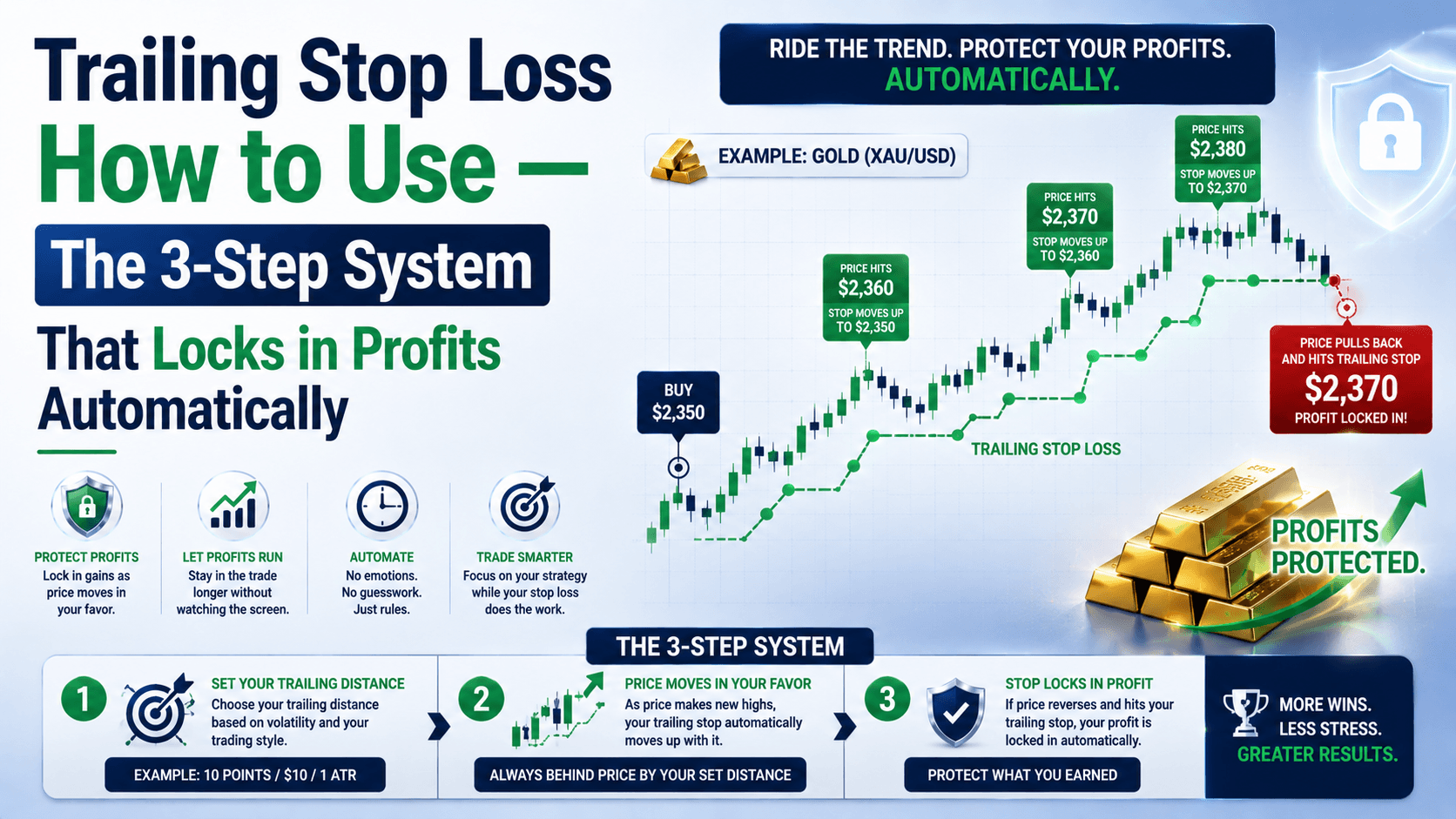
A trailing stop loss is a stop order that automatically follows the price as it moves in your favor. If price reverses, the stop stays put and exits the trade — locking in your profit.
Contrast that with a fixed stop loss: you set it once (say, $2,340 on a Gold long at $2,350), and it stays there forever. If price hits $2,370 and then drops to $2,340, you exit at breakeven — or worse, a loss.
The trailing stop solves this. It moves up (for long trades) or down (for short trades) as price moves. It only moves one direction — in your favor. Once it moves up, it can never move back down.
Here's the key difference in plain English:
| Fixed Stop Loss | Trailing Stop Loss |
|---|---|
| Stays at one price forever | Moves with the market in your favor |
| You must manually adjust it | Adjusts automatically |
| Great for limiting losses | Great for locking in profits |
| Requires constant monitoring | Works while you sleep |
The 3-Step System to Set Up a Trailing Stop Loss
Ready to use one? Follow these steps. I'll use Gold (XAU/USD) as the example — but this works for EUR/USD, GBP/USD, or any forex pair.

Step 1: Choose Your Trailing Distance
This is the most important decision. Set it too tight, and normal price noise stops you out. Set it too loose, and you give back most of your profit.
For Gold (XAU/USD), which moves about 50-80 pips per session, I use a trailing distance of 30 pips on the 1-hour chart. For EUR/USD, which moves 60-100 pips daily, I use 20 pips.
Here's a simple rule:
- Scalping (1-min / 5-min): 10-15 pips
- Day trading (15-min / 1-hour): 20-30 pips
- Swing trading (4-hour / daily): 1.5x the Average True Range (ATR)
💡 Pro tip: Open the ATR indicator on your chart. Set it to 14 periods. Whatever value it shows — multiply by 1.5 for swing trades, or use the raw value for day trades. That's your trailing distance.
Step 2: Place the Trailing Stop on Your Open Trade
In MetaTrader 4 or 5, here's exactly how:
- Right-click your open trade in the "Terminal" window at the bottom
- Hover over "Trailing Stop"
- Select a preset value (e.g., 20, 30, 50 pips) or click "Custom" to enter your own
⚠️ Critical: The trailing stop only works while your platform is open. If you close MT4/MT5, the stop freezes at its last position. Use a VPS (Virtual Private Server) if you trade long-term.
Step 3: Let It Run — Don't Touch It
This is the hardest part. Once the trailing stop is set, do not manually adjust it. Let the market do its thing. Your only job now is to watch the trade play out.
Here's what happens in real numbers:
You buy Gold at $2,350. Set trailing stop at 30 pips ($30).
- Gold hits $2,380 → stop moves to $2,350 (breakeven)
- Gold hits $2,400 → stop moves to $2,370 ($20 profit locked)
- Gold drops to $2,370 → stop triggers, you exit at $20 profit
Without the trailing stop? You'd still be in the trade, watching $2,400 drop to $2,350, and feeling that familiar stomach punch.
Trailing Stop Loss: The Pros and Cons You Need to Know
No tool is perfect. Here's the honest truth.
| ✅ Pros | ❌ Cons |
|---|---|
| Locks in profits automatically | Can stop you out early in choppy markets |
| Reduces emotional decision-making | Requires platform to stay open (or VPS) |
| Works on any timeframe | Not ideal for range-bound markets |
| Saves time — no manual adjustments | Learning curve to set the right distance |
⚠️ Common mistake: Setting the trailing stop too tight on a volatile asset. Gold's average daily range is 50-80 pips. A 10-pip trailing stop? You'll get stopped out by normal noise. Use the ATR method above to avoid this.
Trailing Stop vs. Fixed Stop Loss: Which One Should You Use?
Here's my rule:
- Use a fixed stop loss when you're entering a trade and want to limit your initial risk
- Add a trailing stop loss once the trade moves in your favor by at least 1x your risk
Example: You risk $50 on a Gold trade. Once price moves $50 in your favor, switch to a trailing stop. This way, you can't lose on the trade — worst case, you exit at breakeven.
FAQ
How do I set a trailing stop loss in MetaTrader 4?
Right-click your open trade in the Terminal window, hover over "Trailing Stop," and select your distance in pips. The stop will automatically follow the price.

Can I use a trailing stop loss on mobile?
No — MT4/MT5 mobile apps don't support trailing stops. They only work on the desktop platform or through a VPS with the platform running.
What's the best trailing stop distance for Gold?
For day trading, use 30 pips. For swing trading, use 1.5x the ATR (14-period) value. Check the ATR indicator on your chart — it updates daily.
Does a trailing stop loss guarantee I won't lose money?
No. If the market gaps (opens significantly lower than the previous close), your stop may be executed at a worse price. This is called slippage. Use limit orders to reduce this risk.
Quick Recap
- A trailing stop loss follows price in your favor and locks in profits
- Set the trailing distance based on the asset's volatility (use ATR)
- Place it after the trade moves 1x your initial risk in your favor
- Keep your platform open or use a VPS — otherwise the stop freezes
- Don't manually adjust it once set — let it work
Your Quick Win
Open your MT4/MT5 right now. Find an open trade (or open a demo trade on EUR/USD). Right-click it, go to "Trailing Stop," and set it to 20 pips. Watch how it moves as price changes. That's it — you just automated your profit protection. Do this for every trade from now on.