
The Hidden Cost of Running Automated Strategies on a Home PC
Imagine this: You've spent weeks backtesting a Gold scalping Expert Advisor (EA). The results look solid — 78% win rate over two years of historical data. You deploy it on your home computer before heading to bed. At 2:47 AM, Windows forces a restart for updates. Your EA stops running. A 40-pip move on XAU/USD happens at 3:12 AM — the exact setup your strategy was built for. You missed it.
This scenario plays out more often than most traders admit. The difference between a profitable month and a losing one often comes down not to strategy, but to infrastructure. This is where understanding forex VPS for trading explained becomes critical.
What Is a Forex VPS? (And Why a Regular VPS Won't Cut It)
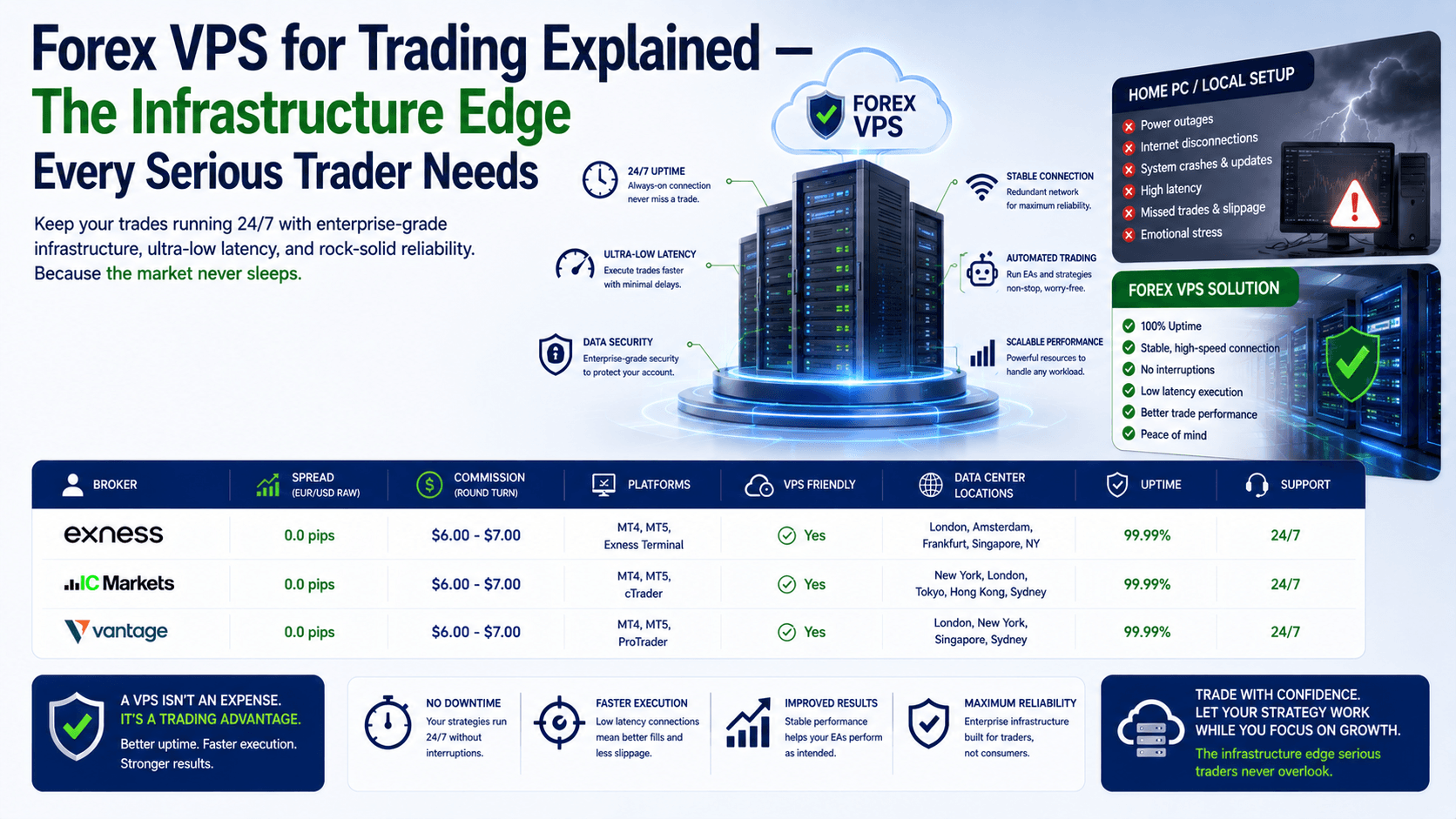
A Forex VPS (Virtual Private Server) is a remote computer hosted in a professional data center, optimized specifically for running trading platforms like MetaTrader 4, MetaTrader 5, or cTrader. It operates 24/7, independent of your home internet connection, power supply, or hardware.
The key distinction from a regular VPS? A Forex VPS is configured for low-latency connectivity to broker servers, often located in financial hubs like London, New York, Frankfurt, or Singapore. When you run your EA on a standard VPS located in a different continent, you're still adding 100-200 milliseconds of latency. A proper Forex VPS puts your platform within 1-5 milliseconds of your broker's execution engine.
How a Forex VPS Transforms Your Trading Workflow
Let's walk through the actual setup process, because forex VPS for trading explained is meaningless without practical context.
The Setup Sequence
- Provision your VPS — You select a plan (e.g., 2 vCPU, 4GB RAM, 60GB NVMe SSD) and a data center location near your broker. Deployment takes under 5 minutes.
- Connect via Remote Desktop (RDP) — Using the IP address and credentials provided, you log into your Windows VPS from your laptop, phone, or tablet.
- Install your trading platform — Download MT4 or MT5 directly onto the VPS. Installation is identical to doing it on your home PC.
- Attach your EAs and configure parameters — Drag your Expert Advisors onto the relevant charts, set your risk parameters, and enable automated trading.
- Disconnect and walk away — Close your RDP session. Your EA continues running 24/5, regardless of what happens to your local machine.
That's it. The entire process takes under 30 minutes. Once configured, your trading platform is no longer tied to your physical location.
Forex VPS vs. Home PC — A Data-Driven Comparison
Here is the side-by-side comparison that most beginner guides skip. These numbers come from real-world latency tests and uptime monitoring across multiple providers.

| Factor | Home PC | Forex VPS |
|---|---|---|
| Uptime reliability | 95-99% (depends on power, ISP, user behavior) | 99.99%+ (redundant power, multi-homed network) |
| Latency to broker | 50-200+ ms (varies by ISP routing) | 1-5 ms (data center co-location) |
| Windows update risk | Uncontrolled restarts | Scheduled maintenance windows |
| Power outage impact | Immediate shutdown | UPS + backup generators |
| Security | Shared with personal browsing, email, downloads | Isolated environment, DDoS protection, firewalls |
| Remote access | Requires third-party software (TeamViewer, etc.) | Built-in RDP, accessible from any device |
| Monthly cost | Electricity + hardware depreciation ($20-50) | $5-30 (depending on resources) |
The Wrong Way vs. The Right Way to Use a Forex VPS
The Wrong Way (What Most Beginners Do)
Scenario: You buy the cheapest VPS you can find — 1 vCPU, 1GB RAM, located in a random data center in Eastern Europe. You install MT4, attach your EA, and assume everything is fine. Your broker's server is in London. Your VPS is in Bucharest. Latency: 45ms. During high volatility, your EA misses entries by 2-3 pips consistently. Over 100 trades, that's 200-300 pips of slippage you never accounted for in your backtesting.
The Right Way (What Professionals Do)
Scenario: You choose a VPS with at least 2 vCPU cores and 4GB RAM, hosted in the same data center region as your broker (London LD4 for most ECN brokers). Latency: 1-2ms. Your EA executes within the spread. Slippage is minimal. Your strategy performs exactly as backtested.
The takeaway? Don't optimize for price alone. Optimize for proximity to your broker's server. That single decision has more impact on your trading results than any other VPS configuration choice.
The $1,200 Lesson — Why Latency Matters More Than You Think
Let's make this concrete with a real calculation. Suppose you scalp XAU/USD with a 0.5 lot size. Your average win is 8 pips ($40). Your average loss is 6 pips ($30). You take 20 trades per day.
With a home PC (100ms latency), you experience an average slippage of 0.5 pips per trade. That's $2.50 per trade, or $50 per day, or $1,200 per month in invisible costs you're accepting because your infrastructure is slow.
With a Forex VPS (2ms latency), slippage drops to 0.1 pips on average. That's $0.50 per trade, or $10 per day, or $240 per month. The VPS costs you $15/month. You're saving $1,185 per month — a 79x return on investment.
This is not theoretical. This is the math that separates traders who understand infrastructure from those who don't.
How to Choose the Right Forex VPS Provider
Not all Forex VPS providers deliver the same quality. Here are the five criteria that actually matter:
- Data center locations — Your provider must have servers in London, New York, Frankfurt, or Singapore. If they only have data centers in one region, you're limited.
- Uptime guarantee — Look for 99.99% or higher. Some providers offer 100% uptime SLAs through high-availability clustering (automatic failover if a physical server fails).
- Dedicated CPU cores — Avoid providers that oversell CPU resources. If the CPU is shared, your EA competes with other users for processing time, especially during high-volatility events.
- Windows license included — Some providers charge extra for Windows Server or require you to bring your own license. A proper Forex VPS includes it.
- 24/7 human support — When something breaks at 3 AM on a Wednesday, you need a human, not a ticket system with a 24-hour response time.
FAQ
Is a Forex VPS necessary for manual trading?
Not strictly, but it helps. If you trade manually during specific sessions, a VPS ensures your platform stays connected and your charts remain live even if your home internet drops.

Can I run multiple trading accounts on one VPS?
Yes, as long as the VPS has sufficient resources. A 4 vCPU, 8GB RAM VPS can comfortably run 3-4 MT4/MT5 instances simultaneously.
How much does a good Forex VPS cost?
Entry-level plans with 2 vCPU and 4GB RAM range from $10-20 per month. Professional plans with dedicated CPU cores and NVMe storage range from $25-50 per month.
Is it safe to store my broker login credentials on a VPS?
Yes, if you choose a reputable provider with enterprise-grade security: DDoS protection, firewalls, and physical access controls in the data center. Avoid cheap, unmanaged VPS providers for this reason.
Quick Recap
- A Forex VPS is a remote server optimized for running trading platforms 24/7 with low latency to broker servers.
- The single most important factor is server location — choose a data center near your broker to minimize latency.
- Latency directly impacts your bottom line. A 100ms delay can cost you $1,200+ per month in slippage on an active scalping strategy.
- Look for dedicated CPU cores, a 99.99%+ uptime guarantee, included Windows license, and 24/7 human support when choosing a provider.
Quick Win — Do This in 5 Minutes
Open your trading platform right now. Check your broker's server location (most brokers list it in their documentation or support section). Then search for a Forex VPS provider with a data center in that same city. Compare the latency difference. You might be surprised how much faster your platform can run.