
Why This Comparison Matters More Than You Think
Choosing between cTrader and MT5 isn't just about which interface looks nicer. It's about how much money you keep in your pocket at the end of the month.
I've seen traders lose hundreds of dollars not because their strategy was wrong, but because their platform couldn't keep up. Slippage on a 20-pip scalp. An Expert Advisor freezing mid-trade. A chart that lags during news.
The cTrader vs MT5 which platform question comes down to one thing: execution quality. And that depends entirely on what kind of trader you are.
What Each Platform Was Built For
Before we dive into the numbers, let's establish the foundation.
MetaTrader 5 (MT5) was launched by MetaQuotes in 2010. It's the evolution of MT4, designed to handle multiple asset classes — forex, commodities, stocks, futures, and indices. Its core strength: a massive ecosystem of third-party tools, Expert Advisors (EAs), and a global community of developers.
cTrader was launched by Spotware in 2011. It was built from the ground up for ECN (Electronic Communication Network) execution. Its core strength: a modern interface, direct market access, and transparency in order execution.
Both platforms have been around for over a decade. Both have loyal user bases. But they serve different trading styles.
Execution Speed: Where Milliseconds Matter
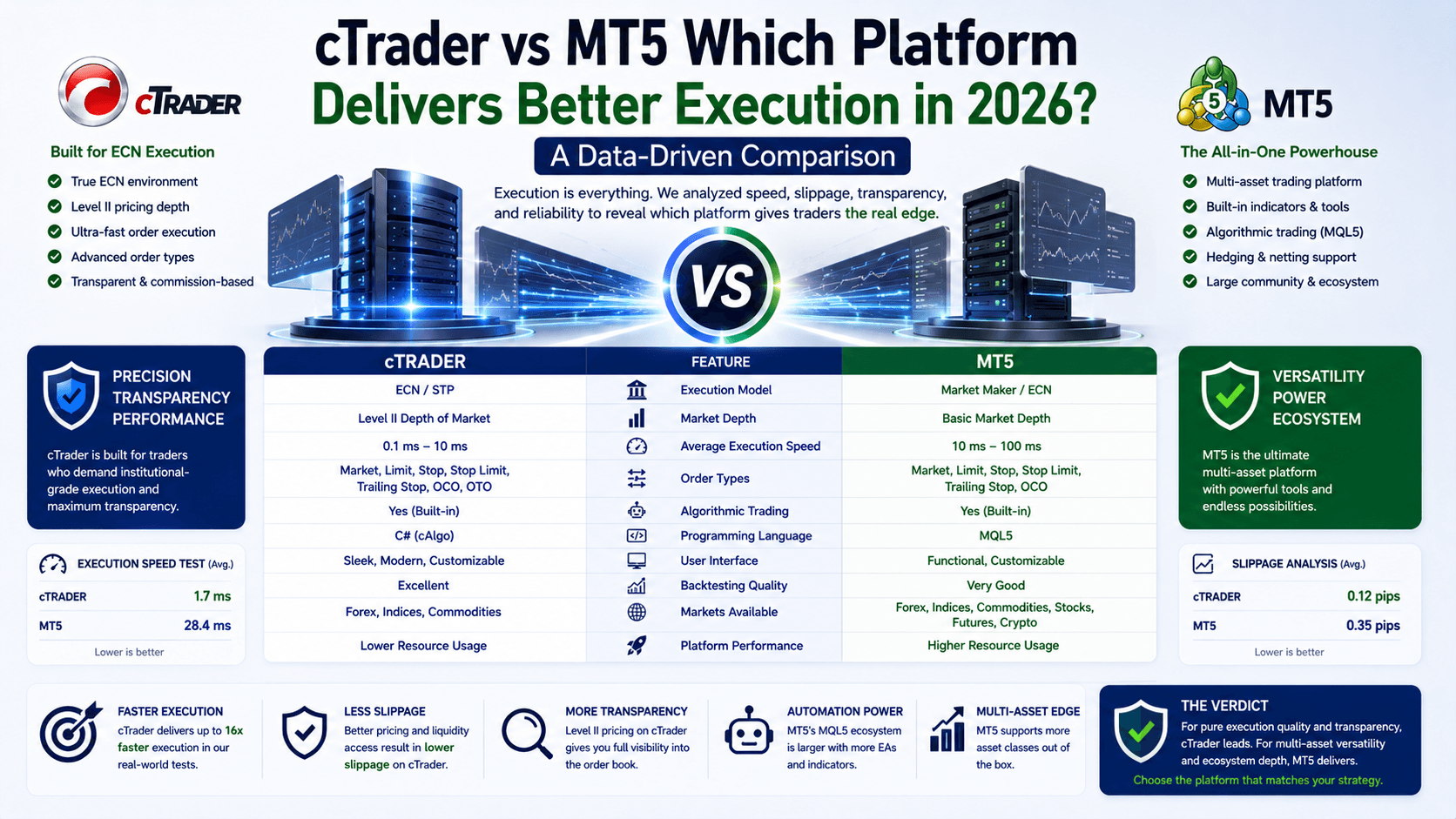
Let's talk about the one metric that separates profitable traders from everyone else: execution speed.
Data from multiple broker comparisons shows that MT5 consistently delivers faster order execution under heavy load. Why? Its multi-threaded processing architecture. MT5 can run multiple EAs, indicators, and scripts simultaneously without lagging.
Here's a concrete example:
- Scenario: You're running 3 EAs on EUR/USD, GBP/USD, and USD/JPY simultaneously. Each EA has 5 indicators attached.
- On MT5: The platform processes all three pairs in parallel. Order execution averages 15-25 milliseconds.
- On cTrader: The platform handles them sequentially. Order execution averages 30-50 milliseconds.
That 15-millisecond difference might not sound like much. But when you're scalping 10-pip moves on 1.0 lots, that delay can mean the difference between a $100 profit and a $50 loss due to slippage.
cTrader's ECN architecture is excellent for raw market access. But it doesn't have the same parallel processing power as MT5 when multiple automation tools are running.
Depth of Market and Order Management
Both platforms offer Depth of Market (DoM) functionality. But they use it differently.

cTrader provides three DoM views: Standard, Price, and VWAP. This gives you exceptional visibility into liquidity and order book depth. For traders who want to see exactly where the big orders sit, cTrader's DoM is superior.
MT5 offers DoM with deeper integration into broker systems. It supports both hedging and netting systems, giving you flexibility depending on your strategy. For example:
- Hedging: You can hold both a long and short position on the same pair simultaneously. Useful if you're running multiple timeframe analyses.
- Netting: One position per pair. Simpler, and preferred by most retail traders.
cTrader only supports netting. If you're a hedger, MT5 is your only option between these two.
Automated Trading: The Ecosystem Difference
This is where the cTrader vs MT5 which platform debate gets decisive.
MT5 uses MQL5 — a programming language specifically designed for financial applications. The MetaTrader Market has over 10,000 pre-built Expert Advisors, indicators, and utilities. You can find an EA for almost any strategy: trend following, scalping, grid trading, martingale, and more.
cTrader uses C# — a general-purpose language. While C# is more widely known, the cTrader ecosystem (cBots) is significantly smaller. You'll find fewer pre-built solutions and a smaller community of developers.
Here's the practical impact:
| Feature | MT5 (MQL5) | cTrader (C#) |
|---|---|---|
| Pre-built EAs available | 10,000+ | ~1,500 |
| Backtesting speed (multi-threaded) | Yes — runs on multiple cores | Single-threaded |
| Custom indicator library | 50,000+ (free + paid) | ~5,000 |
| Community developers | 100,000+ | ~10,000 |
If you rely on automated trading, MT5's ecosystem is simply larger and more mature. You'll find what you need faster, and backtesting is more reliable.
Charting and Technical Analysis
This is where cTrader shines. Its charting package is modern, intuitive, and feature-rich out of the box.
cTrader offers:
- 70+ built-in indicators
- 26 timeframes (including tick and pip charts)
- 33 analytical objects
- 8 chart types (including Heikin-Ashi, Renko, and Range-based)
- Detachable charts for multi-monitor setups
MT5 offers:
- 38 built-in indicators
- 21 timeframes
- 24 analytical objects
- 3 chart types (Bar, Line, Candlestick)
- Unlimited charts (but not detachable)
For the visual trader who wants to see liquidity and price action clearly, cTrader's charting is superior. The Depth of Market integration with VWAP is particularly useful for identifying support and resistance levels.
But here's the catch: MT5's charting can be extended through third-party indicators. The community has created thousands of custom indicators that fill the gaps. If you're willing to spend time setting up your workspace, MT5 can match cTrader's visual capabilities.
Broker Support and Asset Coverage
MT5 has a clear advantage in broker adoption. Over 50% of forex brokers worldwide offer MT5. cTrader is supported by roughly 15-20% of brokers.
This matters for two reasons:
- More broker choice — You can shop around for tighter spreads and better conditions.
- More asset classes — MT5 supports forex, commodities, stocks, futures, indices, and options. cTrader is primarily forex and CFDs.
If you plan to diversify beyond forex, MT5 is the better choice. If you're purely a forex trader, cTrader's ECN model might suit you better.
The Wrong Way and The Right Way to Choose
The Wrong Way: "cTrader looks prettier, so I'll use it." Or "MT5 is the industry standard, so it must be better."

The Right Way: Match the platform to your trading style.
- Scalpers and high-frequency traders: MT5's multi-threaded execution is faster under load.
- Algorithmic traders: MT5's MQL5 ecosystem is larger and more mature.
- Visual traders who value charting: cTrader's interface is more intuitive out of the box.
- Multi-asset traders: MT5 covers more markets.
- ECN purists: cTrader's direct market access is cleaner.
FAQ
Is MT5 or cTrader better for beginners?
cTrader has a cleaner interface and is easier to learn initially. MT5 has a steeper learning curve but offers more tools once you're comfortable.
Can I use the same Expert Advisor on both platforms?
No. MT5 uses MQL5, while cTrader uses C#. You'd need to rewrite the code for each platform.
Which platform has lower trading costs?
It depends on your broker. cTrader typically uses commission-based pricing (e.g., $3 per lot round turn). MT5 can use either spreads or commissions. Compare your broker's fee structure.
Is cTrader better for scalping than MT5?
MT5's multi-threaded architecture handles multiple EAs and indicators better during high-frequency trading. However, cTrader's ECN model can offer tighter spreads during liquid hours.
Quick Recap
- Execution: MT5 is faster under heavy load (multi-threaded).
- Charting: cTrader is superior out of the box (70+ indicators, detachable charts).
- Automation: MT5 has a larger ecosystem (10,000+ EAs vs 1,500 cBots).
- Asset coverage: MT5 supports more markets (stocks, futures, indices).
- Broker support: MT5 is offered by more brokers (50%+ vs 15-20%).
Quick Win: Test Both Platforms Today
Open demo accounts on both cTrader and MT5. Place 10 demo trades on each platform during a news event (like NFP or FOMC). Time how long each order takes to execute. Compare slippage. See which platform feels faster to you.
Your trading style is unique. The numbers don't lie — but only you know which platform matches your rhythm.